Simulator
The Simulator allows you to test a Message Profile without invoking a live downstream provider.
It executes the configured Request or Response pipeline using the selected Service Account and displays the transformed output.
This enables safe validation of encryption, signing, JSON extraction, and transformation logic before deploying to production.
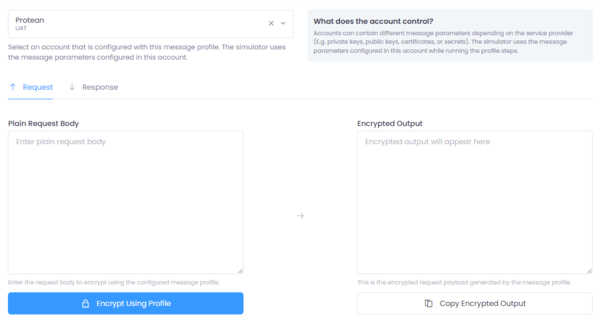
Figure 1: Message profile simulation interface in Connect.
Purpose
The Simulator helps you:
- Validate request encryption logic
- Validate response decryption logic
- Test signature generation and verification
- Inspect intermediate parameter behavior
- Troubleshoot execution errors
It runs the exact same execution engine used during Gateway runtime.
Selecting a Service Account
Before executing the profile, select a Service Account.
The selected account provides:
- Cryptographic material (Private Keys, Public Keys, Secrets)
- Dynamic message parameters
- Environment-specific configuration values
If a step parameter uses Mustache syntax such as:
{{PRIVATE_KEY}}
The Simulator resolves the value from the selected Service Account before executing the step.
This allows the same Message Profile to be reused across multiple environments (UAT, Production, etc.) without modifying step configuration.
Request Mode
The Request tab simulates outbound processing.
Steps executed:
- All configured Request pipeline steps
- In configured execution order
Input:
- Plain request body
Output:
- Transformed or encrypted request body
The result displayed represents the final value of:
REQUEST_BODY_OUTPUT
Response Mode
The Response tab simulates inbound processing.
Steps executed:
- All configured Response pipeline steps
- In configured execution order
Input:
- Encrypted or raw downstream response
Output:
- Decrypted or transformed response body
The result displayed represents the final value of:
RESPONSE_BODY_OUTPUT
Error Handling
If a step fails during execution:
- Execution stops immediately
- The error message is displayed
- No partial output is produced
The Simulator returns only the step error message to help isolate configuration issues.
Execution Behavior
The Simulator uses:
- The selected Service Account
- The configured Message Profile
- The same step execution engine used at runtime
No downstream call is performed.
All processing occurs locally within the profile execution context.
Summary
The Simulator provides a controlled environment to validate Message Profile behavior before enabling it in live Gateway traffic.
By combining Service Account parameter resolution with deterministic step execution, it ensures predictable and secure integration testing.